Overview
Here we have videos that review the following:
- Standard race management: Using SRA to manage the various aspects of running a race, from skippers signing, to the race concluding and the final overall scoring and positioning.
- General recall: Using SRA to cope with exceptional situations. In the video below we look at handling a general recall of division 1 and then division 2. It also reviews how the final scoring is computed in either of these situations.
Other recommendations
- On the day of the race pick up the sign in sheet from the club house when you sound the harbour horn. Skippers arriving later than this can radio in their registration.
- Enter the racers into the app
- Choose someone to manage the app, the other will work the flags and call out sail numbers crossing the finish line.
- After the race take the tablet to the club house and announce the results of the race(s) to everyone gathered there.
- Don't forget to press the 'Mail' button to send the results to the scorer.
- Download "SraTutor" from the Apple or Google apps stores and practice using it ahead of time.
A run through of typical race management
Pre-Race Config and Sign In
Managing the Race
Post Race Scoring
Handling a general recall
Summary of the process
The adjacent video provides the detail on performing a division 1 and division 2 general recall. The text below provides a summary.A division one recall is simply a matter of starting the app again. You press the control button when annotated with "Recall Div 1" and after confirmation the app then resets all times and is ready to start all over again. All boats are delayed in the event of a division one recall.
With a division 2 recall the situation is a little more complex. We will walk through the steps:
- After pressing the control button to perform the general recall the app will wait for you to reassemble the division 2 fleet. Note the clock keeps running, it never stops during a race. Internally the app has gone into a state where it is waiting for you to restart division 2.
- When you reassembled the division 2 fleet behind the start line you press the control button which will now be annotated with "Start New Seq". The app internally notes the exact time that you do this. If you have SRA managing the ollie box then it will take care of the new start sequence. If you are using an external ollie box then you will need to press the "Start New Seq" button at the point the division flag goes up.
Scoring
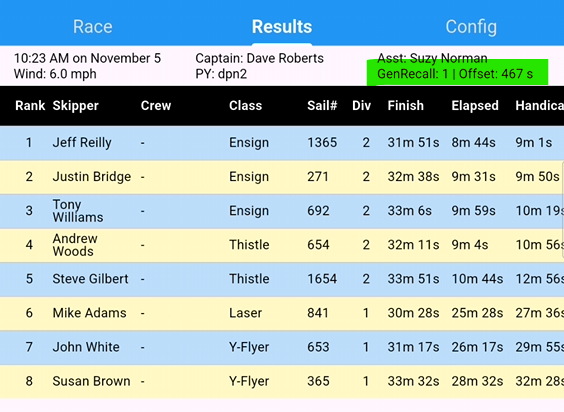
Once all boats are finished and the results certified then the use of a general recall of division 2 is recorded in the top right of the screen (Note the green highlighted area in the screen shot). This shows that a single general recall of division 2 was used and that the 'offset time' was 467 secs or 7min 47sec. The 'offset time' is the time taken to reassemble the fleet and begin a new sequence. The 'Elapsed Time' is computed as follows:
|
|